
* THESE NOTES ARE CURRENTLY UNDER DEVELOPMENT AND ARE NOT 100% ACCURATE *
All images, text, JavaScript and HTML Code ©1995- by llamamusic.com
This web browser utility reads D‑10 Bulk Dump *.SYX files from a computer, tablet or smartphone and displays all Patch & Tone names. It was designed to create Patch and Tone listings from all of my Roland and third‑party PCM cards (PN‑D10‑03, Valhala, Best Choice, Voice Crystal, etc...) and various D‑10 SysEx files downloaded from the Internet. The method used is to LOAD ALL from a PCM card or RAM Memory Card into Internal Memory and then perform a BULK DUMP (Dump One Way ‑ All) on the D‑10 to create a valid SysEx file. Likewise, you can also load D‑5/10/20/110 SysEx files into the D‑10, perform a BULK DUMP and save SysEx files which can then be read by this utility. This utility will not work with any SysEx files previously created on a D‑5, D‑10, D‑20 or D‑110 synth (unless it was saved on a D‑10 using BULK DUMP (Dump One Way ‑ All)
Version 1.0(a) - 12/31/2023
     • Initial Release
Version 1.1 - 02/22/2024
     • Fixed a bug which was not displaying "Less Than" and "Greater Than" characters for Patch and Tone Names ("<" and ">")
Notes About D‑10 SysEx Bulk Dump Files & Synth Structure
- As you have probably noticed, there are several D‑10 SysEx files to be found on the Internet. Not all of these files will load correctly into the D‑10. Likewise, not all of these files will work with this utility. This utility is designed to work only with D‑10 SysEx files created using the BULK DUMP (Dump One Way ‑ All) method. This utility is able to tell the difference between SysEx file structures when you load them. The size of a Dump One Way ‑ All file is ~44KB
- There are a few D‑10 Patch banks in a *.ZIP file at this link which you can use to test the program, all saved as BULK DUMP (Dump One Way ‑ All)
 D-10_Reader_SysEx_Test_Files.zip
- SysEx files created on a D‑110 will load on a D‑10 but only 128 Tones will be loaded. No Patch info will be transferred. This is because D‑10 Performance Patches, Rhythm Patterns and Rhythm Tracks are not compatible with the D‑110. Keep this in mind when working with D‑110 files on a D‑10 because the Patch columns will have generic or blank enteries

- When using this utility on a Mac system, to speed up the load process, open a Finder window and search for all *.SYX files. Drag one file at a time from the Finder window directly onto the "Choose File (Safari/Chrome)" or "Browse (FireFox)" button in this browser utility. The file will then be read automatically without having to drill down and search through several directories (click for larger image)
D-10 Architecture
P A T C H E S
There are a total of 128 user editable Patches on the D‑10. The settings you can change in Patches are:
Patch Name - Reverb - Assign Mode - Panning - Tone Select - Tuning - Split Point - Bender Range & more
When you load a SysEx file, these 128 user Patches are overwritten with whatever data is contained in the SysEx file
T I M B R E S
There are a total of 128 preset Timbres on the D‑10. The settings you can change in Timbres are:
Tone Select - Fine Tuning - Reverb Switch - Assign Mode - Bender Range - Key Shift
When you load a SysEx file, these 128 Timbre settings are overwritten with whatever data is contained in the SysEx file
T O N E S (User Editable)
There are a total of 64 user editable Tones on the D‑10. The parameters you can change in Tones are:
Common Parameters (Envelopes, LFO's, Frequency, etc...) - PCM Waveform - Structure - Tone Name & more
When you load a SysEx file, these 64 user Tones are overwritten with whatever data is contained in the SysEx file
T O N E S (Preset Internal)
There are a total of 128 preset internal Tones on the D‑10. These are hard coded on IC12 and cannot be edited (ROM)
When you load a SysEx file, these 128 preset internal Tones are unaffected
M E N U D I V I N G
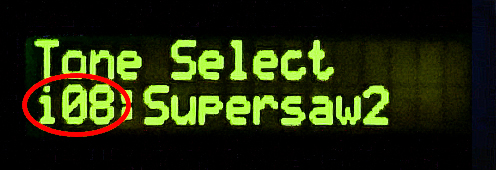
While scrolling through the menus on the LCD, you will notice different prefixes in front of the various sound names
       i08 = User Editable Tone #08     (RAM) / Bank i  (Bank i Tones can be edited and/or overwritten by a SysEx file)
     I-A36 = User Editable Patch #36    (RAM) / Bank A  (Bank A Patches can be edited and/or overwritten by a SysEx file)
     I-B84 = User Editable Patch #84    (RAM) / Bank B  (Bank B Patches can be edited and/or overwritten by a SysEx file)
       a46 = Preset Internal Tone #46   (ROM) / Bank a  (Bank a Tones can not be edited and/or overwritten by a SysEx file)
       b17 = Preset Internal Tone #17   (ROM) / Bank b  (Bank b Tones can not be edited and/or overwritten by a SysEx file)
       r59 = Preset Internal Rhythm #59 (ROM) / Bank r  (Bank r Rhythms can not be edited and/or overwritten by a SysEx file)
Questions & Answers
Microsoft: Windows Server 2016 Iso
Have you deployed Windows Server 2016 recently? Share your experience or troubleshooting tips in the comments below. For more guides on server management, PowerShell automation, and cloud integration, subscribe to our newsletter.
Enterprise customers with volume licensing agreements should log into the Volume Licensing Service Center to download the Windows Server 2016 ISO. This version is tailored for KMS (Key Management Service) or MAK (Multiple Activation Key) activation. Verifying ISO File Integrity (SHA-256 Checksum)
Having the ISO is only half the battle. You need a valid license key.
Select Custom: Install Windows only (advanced) for a clean installation. (Only use Upgrade if you are upgrading from a supported version and have backed up your data.) microsoft windows server 2016 iso
Select the primary partition and click to begin copying files. Step 7: Finalize Administrative Setup
Always source your ISO file directly from official Microsoft channels to avoid malware. 1. Microsoft Evaluation Center
Once you have used your ISO to install the OS, follow these best practices: Have you deployed Windows Server 2016 recently
Maximum of 2 CPU sockets and 64 GB of RAM. It cannot run virtual machines as a host.
Choose the appropriate Windows Server 2016 edition (Standard or Datacenter). You can choose between:
512 MB (2 GB is recommended for servers with the Desktop Experience). Disk Space: 32 GB minimum. You need a valid license key
Get-FileHash -Path "C:\Users\Admin\Downloads\Windows_Server_2016_ISO.iso" -Algorithm SHA256 Use code with caution.
Servers must maintain predictable network addressing. Configure a static IPv4/IPv6 address, subnet mask, default gateway, and point to your local DNS infrastructure.
Whether you are setting up a home lab or migrating a Fortune 500 data center, this guide should equip you with the knowledge to handle every step, from download to deployment. Always keep your ISO in a secure repository, validate its hash, and stay tuned for Microsoft’s security updates to protect your server estate through the remainder of its extended support lifecycle (until January 2027).
| If you find some of this DIY info useful, please consider donating a small amount. All donations are used for future DIY sampler development. Thanks! | 
|
 Back To The D-10 Patch & Tone Reader Utility